Aweta · Lead Intelligence Report · May 2026

New York State

59 qualified commercial leads across apple, onion, bell pepper, stonefruit, and cucumber operators — ready for outreach.

59
Qualified leads
32
Top tier (A)
65%
DM phone coverage
5
Target commodities

Scroll to explore — or jump straight to the lead list.

What we found

A snapshot of the 59 qualified leads — the New York grower-packers most likely to invest in optical sorting, grading, and packing equipment over the next 12-24 months.

By tier

By region

By commodity

DM phone coverage

Decision-makers reachable by phone

DM email coverage

Decision-makers reachable by email

DM name + title found

Leads with a named decision-maker and verified role

Geographic spread

59 leads pinned across New York State, clustered around the Hudson Valley apple belt, Western NY (Wayne / Orleans / Niagara), the Champlain Valley, and the Long Island / NYC produce trade. The full map opens in a dedicated view with search, score filters, marker clustering, and a Google Maps route planner — built for planning customer visits.
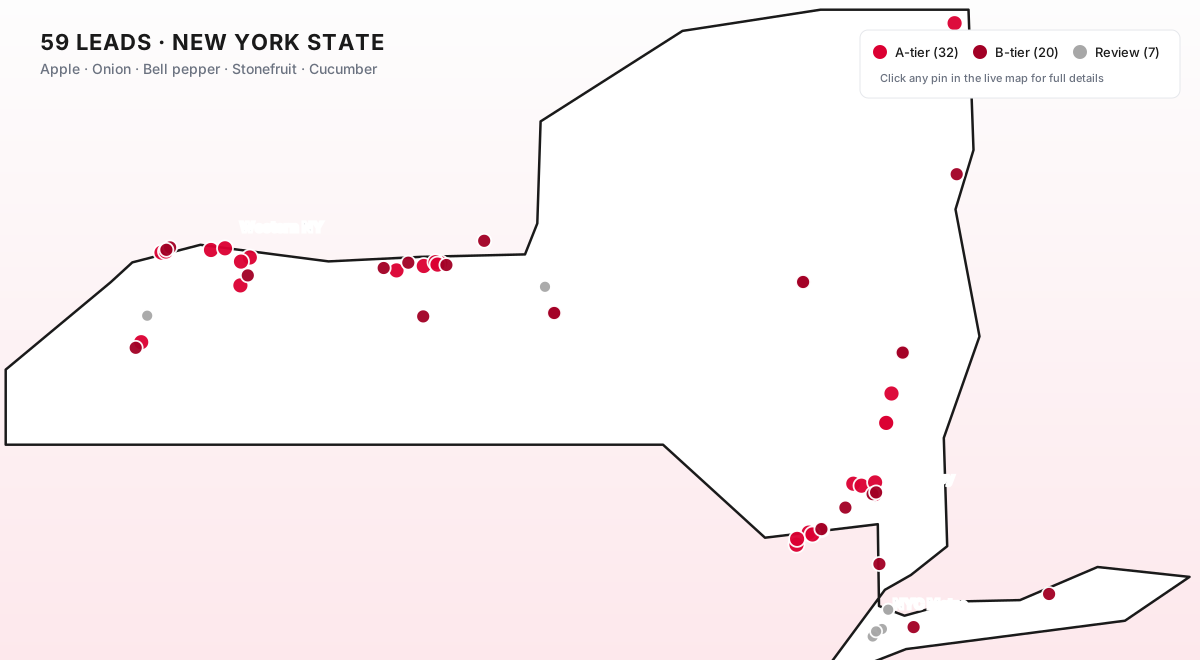
Lead map preview — New York State
Open full map →
32 A-tier 20 B-tier 7 Review Needed 📍 New York State

Leads

All 59 qualified leads. Filter, sort, or search to narrow the list. Click any row to unfold the full intelligence brief, contact decision-makers, and update status.

Company Tier Decision-maker Status Need

Engagement workflow

Your day-to-day will mostly happen inside Airtable. Here is the simple flow we recommend — and how your updates feed back into making the next batch sharper.

1

Open a lead in Airtable

Click the "Open →" button on any spotlight card, map pin, or database row. The full record opens directly in Airtable, where you have every field at hand — equipment notes, sales angle, decision-makers, and contact details.

2

Update Status as you go

Set the Status field to Contacted, Meeting Booked, Site Visit, Quoting, Won, Lost, or Not Relevant. Takes 2 seconds, gives us the signal we need.

3

Drop notes in Sales Notes

Short notes per record: who answered, what equipment they already run, what's blocking, when their packhouse upgrade cycle is. We read every note to learn how to find better leads — competitors mentioned, signals we missed, etc.

4

Flag bad leads with Not Relevant

If a lead is out of scope, set Status = Not Relevant and add a 1-line reason in Sales Notes. We use these to filter the next batch automatically — every "no" makes the next list sharper.